

Appearance
Elements
Simply put, elements are the layout nodes you can see and touch. They have a geometry and can be nested.
For instance, a kitchen element contains casework elements, which in turn may contain asset elements, such as a sink.
Edge elements
Start and end points are defined by the referenced edge. For walls, the geometry is an extrusion, and the profile is a result of the width, offset parameters and connected walls.
If edges of two walls share the same vertex, they are connected.
Wall elements can contain opening elements.

json
{
    "type": "element:wall",
    "edge": <edge-id>,
    "parameters": {
        "height": 2,
        "offset": 0.1,
        "width": 2
    },
    "elements": [
        // optional opening elements
    ]
}
Edge element types
element:wallThe standard linear wall.
element:spaceDividerElement without geometry, used to divide spaces.
Boundary elements
Defined by boundaries of edges.

json
{
    "type": "element:boundaryWall",
    "boundaries": [
        { "edges": [<edge-id>, <edge-id>, <edge-id>] }
    ],
    "parameters": {
        "height": 2,
        "elevation": 0
    }
}
Boundary element types
element:boundaryWallPolygonal wall, controlled by edges.
element:floorBottom geometry for spaces.
element:ceilingTop geometry for spaces.
Opening elements
Nested inside a wall or slab element.

json
{
  "type": "element:opening",
  "parameters": {
    "position": [1, 1],
    "dimensions": [1.5, 1.2]
  },
  "elements": [
    // optional window or door element
  ]
}
Transform elements
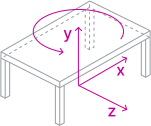
For transform elements, semantics and representation is completely decoupled. They are positioned using the standard transform.
json
{
    "type": "element:asset",
    "position": [2, 0, -1],
    "rotation": 90,
    "product": <product-id>
}
Transform element types
element:asset
Asset elements, such as furniture or technical equipment, reference a product definition. The representation is completely controlled by the product definition.
element:beamLinear structural support element.
element:caseworkSimple cuboid element that can be used standalone or nested in kitchens.
element:columnStructural element that uses by default an extrusion with variable profiles.
element:doorFlexible element for single leaf, double leaf or sliding doors.
element:genericGeneral purpose element, with completely customizable geometry.
element:kitchenAssembly element that combines a number of casework elements with optionally contained asset elements.
element:rampSimple element with triangular horizontal extrusion.
element:stairsAssembly element that combines
stairFlightelements and slabs to form various stair configurations.element:stairFlightStraight or spiral stair flight.
element:windowSimple element with optionally subdivided glass panels.